
Incident Status Page: Public Status Page Tool
System downtime loses customers, but radio silence loses their trust. Our modern Incident Status Page gives your dev, ops and support teams one dependable place to broadcast live updates. Nothing damages customer confidence quicker during an outage than poor communication. Our status page software unifies your technical and support teams around a single source of truth for real-time system updates.
- Create a public, private or internal incident status page
- Connect for monitoring different outages, services and more
Why Public Status Pages Are Essential
Operating a dedicated status page mitigates the operational and financial risks of unexpected downtime. A dedicated status page serves as a single source of truth, drastically cutting repetitive inbound tickets so your support team stays focused and helps transforms how an organization navigates unexpected outages:
Ticket Deflection
Acts as the definitive hub for incident updates, significantly lowering inbound support volume during outages
Proactive Transparency
Safeguards client retention by visibly demonstrating active incident resolution
SLA & Uptime Verification
Provides verifiable historical data to substantiate stability claims during sales cycles
Infrastructure Redundancy
Runs on separate cloud infrastructure, ensuring continuous communication availability when your main stack fails
Core Features & Capabilities
Automated Monitoring Integrations
Connect directly to tools like Datadog, PagerDuty, or AWS CloudWatch to automatically change component statuses and create incidents instantly
Scheduled Maintenance Manager
Plan and announce scheduled maintenance windows in advance, keeping customers informed without causing panic
Custom Branding & Domains
Host on your custom domain (i.e. status.yourcompany.com) with complete CSS, logo and color theme control to maintain brand continuity
How It Transforms Incident Operations
Instead of wasting critical minutes drafting manual emails or updating social media during a crisis, team members can update status components in seconds or let automated monitoring handle it entirely. By turning incident response into a streamlined, transparent process, our platform empowers modern organizations to turn potential communication disasters into moments of proven dependability.
Public, Private and Internal Status Pages
Different audiences require different levels of visibility during an outage. Operating dedicated Public, Private and Internal status pages ensures the right stakeholders receive precisely the right details without compromising security or cluttering public communication.
Public Status Pages
Built for end-users, customers and prospects, a public status page acts as your company's official public bulletin for system health
Primary Objective: Maintain brand transparency, protect your reputation and deflect incoming support tickets during major incidents
Key Audience: Active customers, prospective enterprise buyers, media and third-party developers
Core Characteristics: High-level status messaging (i.e. "Degraded Performance" vs. explicit database errors), clean user interfaces or custom domain branding and public subscription options (Email, SMS)
Private Status Pages
Private (or audience-specific) status pages restrict access to designated third parties, giving tailored status visibility to specific client accounts or vendors
Primary Objective: Deliver bespoke uptime visibility for high-value enterprise accounts without exposing broad system metrics to the general public
Key Audience: Enterprise B2B clients, key API partners and strategic vendors
Core Characteristics: Password-protected or SSO-authenticated access, customer-specific SLA tracking, isolated component views based on client-assigned infrastructure and NDA-compliant incident logs
Internal Status Pages
Internal status pages serve engineering, IT operations, customer success and executive leadership behind your company's firewall or single sign-on (SSO)
Primary Objective: Align internal teams during an active incident, accelerate technical response times and provide real-time operational context to front-line support staff
Key Audience: DevOps engineers, incident commanders, support leads, account managers and C-suite executives
Core Characteristics: Granular technical details (error logs, latency metrics, impacted Kubernetes clusters), deep monitoring tool integrations, internal-only post-mortems and runbook links
Creating a Calmer Incident Management Process
During a major outage, panic and chaos can stall technical fixes while teams scramble to write customer updates. A dedicated status page streamlines this workflow, driving faster updates to end users while establishing a calm, structured environment for incident responders.
How Status Pages Accelerate Customer Updates
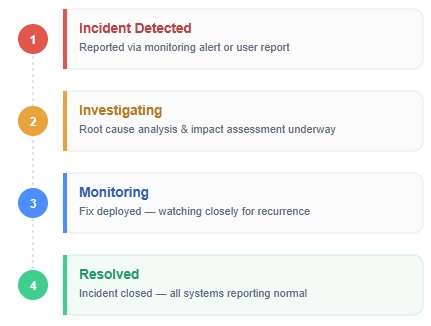
- Pre-Approved Incident Templates: When a critical service fails, responders don't need to draft copy from scratch under pressure. Pre-built templates ("Investigating," "Identified," "Monitoring") allow teams to publish clear, professional status changes in seconds
- Automated Triggering & Monitoring Hooks: Integrations with tools like PagerDuty, Datadog, or AWS CloudWatch trigger automatic status updates the moment metrics breach designated thresholds, delivering instant notifications before users even notice a delay
- Unified Multi-Channel Broadcasting: Instead of manually posting to X/Twitter, sending bulk email blasts and updating support chat widgets, publishing an update on the status page automatically propagates the message across all connected channels simultaneously
- Centralized Source of Truth: Directing all inbound traffic to a single, dedicated platform prevents fragmented, contradictory messages from circulating across different support agents or marketing channels
Explore our Incident Status Page Platform
Keep your customers informed and your teams connected.